 Bot for Kalshi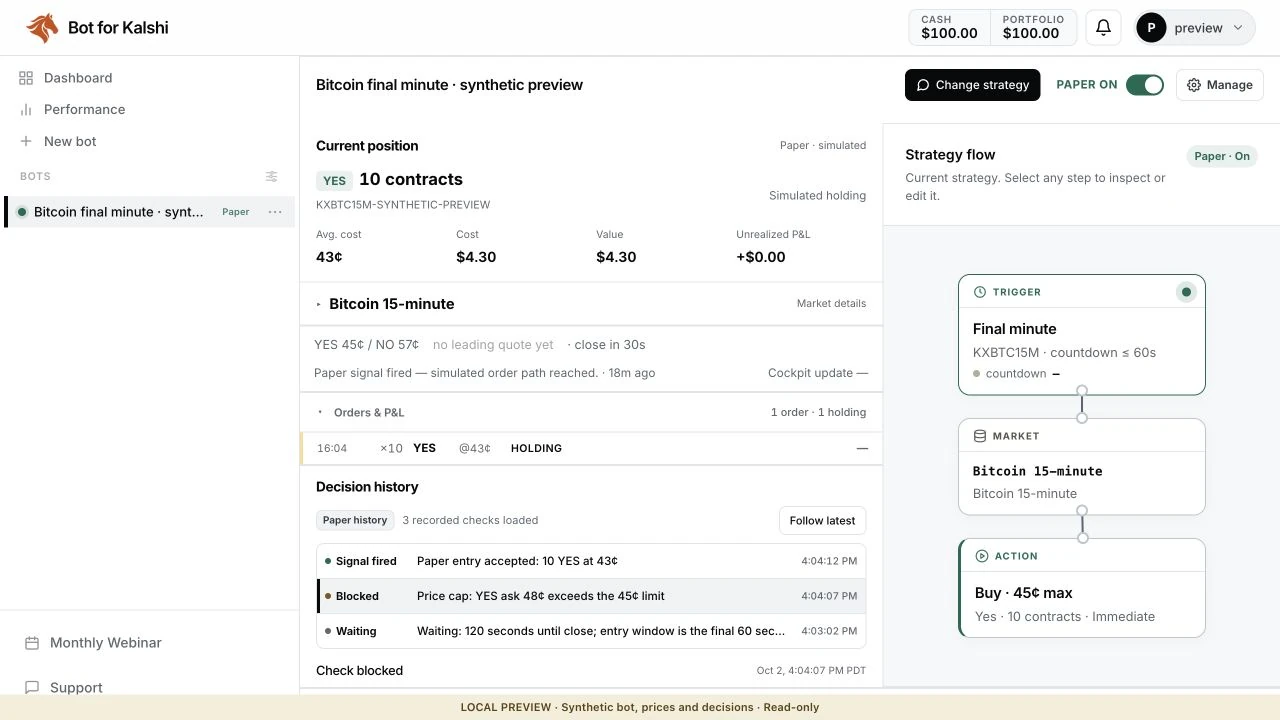
Not a developer? No problem. You don't need to write code to automate a supported trading rule on Kalshi. In the Bot Builder you describe the rule in plain English, answer a few follow-up questions, and review the diagram it draws before anything can trade.
This guide walks through what a new customer actually sees, from connecting Kalshi to reading a first Paper result. Comparing platforms first? See our roundup of the best Kalshi trading bots.
This page is the step-by-step implementation tutorial. For the current product workflow, supported rule types, and plan comparison, use the indexed no-code Kalshi bot overview; return here when you are ready to assemble the rule.
What is the Bot Builder?
The Bot Builder is a chat next to a diagram. You describe the rule, and the builder turns it into a strategy flow: the exact path the bot evaluates, with its conditions, market, side, quantity, maximum price, and any exit. Orders are limit orders by default, each for a single market; the builder does not place linked multi-leg (parlay) orders. The hosted engine checks conditions on its operating cadence, not tick by tick.
How It Works
- Describe the rule in chat and answer the builder's questions.
- Review the strategy flow and your limits: the draft is saved and off.
- Run it in Paper: Paper reads public market data, so no Kalshi API key is needed yet.
- Connect your Kalshi API key only when you choose real money. Keys are encrypted at rest.
You need an active Bot for Kalshi subscription. Real money also needs your own verified Kalshi account and a Kalshi API key. Setup time varies with the rule and the account connection.
Building Your First Bot
Let's build a bot that buys a contract at a target price, then offers it back higher. The numbers are for illustration, not a recommendation.
Step 1: Connect Your Kalshi API Key (for real money)
Paper reads public market data without a key, so you can skip this step until you choose real money. When you do: at kalshi.com, open Settings, then API, and create a key. Copy its API Key ID and download the private key file (Kalshi shows it only once). Paste both into Bot for Kalshi's Settings and test the connection; copying the key file from a text editor is easiest on a computer.
Step 2: Describe the Rule in Plain English
Open the Bot Builder and describe the rule in plain English in the chat, or tap an example to load it and edit it before sending. Name the market, side, quantity, maximum price, timing, and exit:
When the YES ask on the market I choose is 35 cents or less, buy 5 YES contracts with a limit price of 35 cents. After the entry fills, place a resting sell at 55 cents. Trade only this market and hold anything unsold to settlement.
Step 3: Answer the Clarifying Questions
When something is missing or ambiguous, the builder asks, usually with tappable choices: which exact market, whether an unfilled order should cancel immediately or rest, or whether to trade only the current market or every new market window. A builder reply can take a minute or more; wait for it before sending another message.
Step 4: Review the Strategy Flow and Your Limits
Select any step in the strategy flow to check the market, side, contract count, maximum price, execution, and exit; choose Change strategy to fix something. The draft is saved and off and cannot place orders until you start it. Your account-wide risk limits in Settings (loss per trade and per day, amount at risk in one market, open positions) apply across all of your bots.
Step 5: Run It in Paper
Add virtual funds to your separate Paper Account, then press Start bot and choose Start in Paper. Paper uses live quotes to model fills, fees, positions, and P&L and never sends an order to Kalshi. A skip with a clear reason is a useful result; Paper results do not predict live results.
Step 6: Turn On Real Money, Explicitly
Placing live orders is a separate, explicit permission: pause the bot, turn it on again, and choose Start with Real money. Real-money orders use funds you have deposited in your Kalshi account. Real limit orders may fill partially or not at all, and Kalshi's fees apply. Pausing requests a stop to new actions but does not close positions; verify open orders and positions at Kalshi.
Entries, Exits, and Repeats
Within the supported catalog, one strategy can combine these parts, and the flow shows each one:
| Part | What It Does | Use Case |
|---|---|---|
| Entry condition | Buys when a price, time, or supported signal condition passes | Buy at or below a target |
| Resting exit | After an entry fills, places a limit sell at your target | Take profit at a set price |
| Stop-loss step | Requests an exit when its condition passes; no price or fill guarantee | Limit a losing position |
| Repeat behavior | By default, one open position per market at a time; after it closes, the bot can enter again once its cooldown passes and the conditions still hold. Pause the bot to stop after one round trip. | Repeated cycles without stacking |
| Recurring series | Evaluates each new market in a supported recurring series | The same rule on every 15-minute crypto window |
If the flow has no exit step, the bot does not sell what it buys; the position stays open until settlement or until you close it at Kalshi.
Supported Inputs and Boundaries
The builder is strongest when the rule can be expressed with the conditions shown in the app. The runnable catalog includes Kalshi price/time conditions; selected ESPN game events; NFL/NBA/MLB/NHL injury headlines; today's NWS forecast high/low at supported stations; NWS alerts; crypto/equity prices; SEC filings and earnings; geophysical events; and two named polling aggregates. External sources are cached and can be delayed or unavailable.
RSS/keyword, arbitrary CPI/jobs/Fed-funds, ICE/EIA/AAA, sportsbook-consensus, election-model, and candidate-race inputs are not runnable product triggers. You can still use those sources in your own research and convert your conclusion into a supported price or timing rule. If an unsupported feed itself must fire the trade, use a separate authorized custom integration and validate its license, latency, normalization, and failure behavior.
Strategy Examples
Weather Fade Bot
For today's high/low at a supported station, the builder can evaluate the native NWS forecast threshold; the feed is cached and forecast issuance is not tick-by-tick. The product does not turn that forecast into an implied probability or support arbitrary forecast models, precipitation forecasts, or future-day model inputs.
Sports Price Target Bot
Buy YES on a team in one exact game when its price is at or below your ceiling, with a resting sell at a higher target. In-game rules can instead watch a supported live score margin; the builder asks you to pick the game.
Recurring 15-Minute Crypto Bot
Point the bot at a supported recurring series, such as the Bitcoin 15-minute markets, and it evaluates each new window with the same rule. Fees decide this one: across 6,298 settled KXBTC15M windows we measured a gross edge of about +0.67 cents per contract for buying the leading side against an average taker fee of about 1.55 cents, so the taker fee is larger than the measured edge. Our Bitcoin bot walkthrough inspects a full example.
No-Code vs. Custom Code: When to Upgrade
The builder handles rules that fit the supported catalog. Consider custom code when you need:
- Complex mathematical models (ML, custom statistics)
- Cross-platform arbitrage (trading Kalshi and Polymarket simultaneously)
- High-frequency strategies (sub-second execution)
- Custom data integrations beyond our built-in signals
For a supported rule, the visual builder removes server maintenance and makes the logic easier to review. Check the current condition list first, paper-test the workflow, and move to custom code when your rule needs an unsupported input or execution model.
Frequently Asked Questions
Quick answers to common questions about Kalshi Bot Builder: Automate Trades Without Writing Code.
Do I need to know how to code to build a Kalshi bot?
No. You describe the rule in plain English (entry signal, position size, exit, risk limits), answer the builder's follow-up questions, and review the resulting diagram of conditions and actions instead of writing Python. The hosted engine runs the saved rule once you turn it on.
What kinds of strategies can a no-code builder handle?
Rule-based strategies using the current in-app catalog: Kalshi price/time conditions, selected sports events, NFL/NBA/MLB/NHL injury headlines, today's NWS high/low at supported stations, and other named sources. It is not an arbitrary-data platform; RSS/keyword, arbitrary macro-release, sportsbook-consensus, and candidate-race feeds are not runnable triggers. External sources are cached and can be delayed or unavailable.
Where does a no-code bot run after I build it?
On hosted infrastructure, so your laptop does not need to stay open. Evaluation and order submission still depend on the service, Kalshi, and any required upstream source being available.
Can I test a no-code bot before going live?
Yes — Bot Builder Paper mode uses live quotes to model fills, fees, positions, and P&L in a separate virtual account before you consider real-money operation. It never submits a Kalshi order, and modeled results do not reproduce queue position, latency, partial fills, rejection, slippage, or live performance.
How is a no-code builder different from copy trading?
Copy trading mirrors someone else's positions; a no-code builder runs YOUR rules. You stay in control of the logic and risk, which is more transparent and easier to adjust than blindly following another account.
Cite this guide
Using this guide in an article or research summary? Please credit Bot for Kalshi and link to this page so readers can check the source and its latest updates.
Bot for Kalshi Team. Kalshi Bot Builder: Automate Trades Without Writing Code. Bot for Kalshi. Updated October 22, 2026.
Bring a strategy. Watch it become a bot.
Join the free live build on October 27 at 6:00 PM Pacific. Bring a market and a rule, or just watch. We’ll build a draft, review the workflow, demonstrate paper mode, and answer your questions.
We'll email the calendar invite and reminders for this webinar. Registering does not create an account. See our Privacy Policy.